Scaling a Network of 80+ Websites
Large projects rarely grow successfully by chance. Behind stable growth, strong engagement, and consistent improvements there is usually a combination of thoughtful design, technical…
Your cart is empty
Your cart is empty

Modern websites vary widely in visual style, but what truly shapes an enjoyable browsing experience are the thoughtful, user‑centric features built into the interface. These subtle enhancements make navigation intuitive, reduce friction, and ensure that users feel supported at every step. Below is a refined overview of the key features we implement—each designed to make interaction smoother, more efficient, and more personalized.
As soon as a user begins typing in the search bar, intelligent suggestions appear—model names, categories, or popular queries. This accelerates the search process and improves accuracy, helping users find what they need with minimal effort. The system feels proactive, intuitive, and responsive.
Video example of how this feature looks
Users can sort videos, galleries, or albums by relevance: newest, most popular, most viewed, and more. This instantly organizes large collections of content and makes it easier to locate exactly what matches the user’s intent.
Screenshot example of how this feature looks
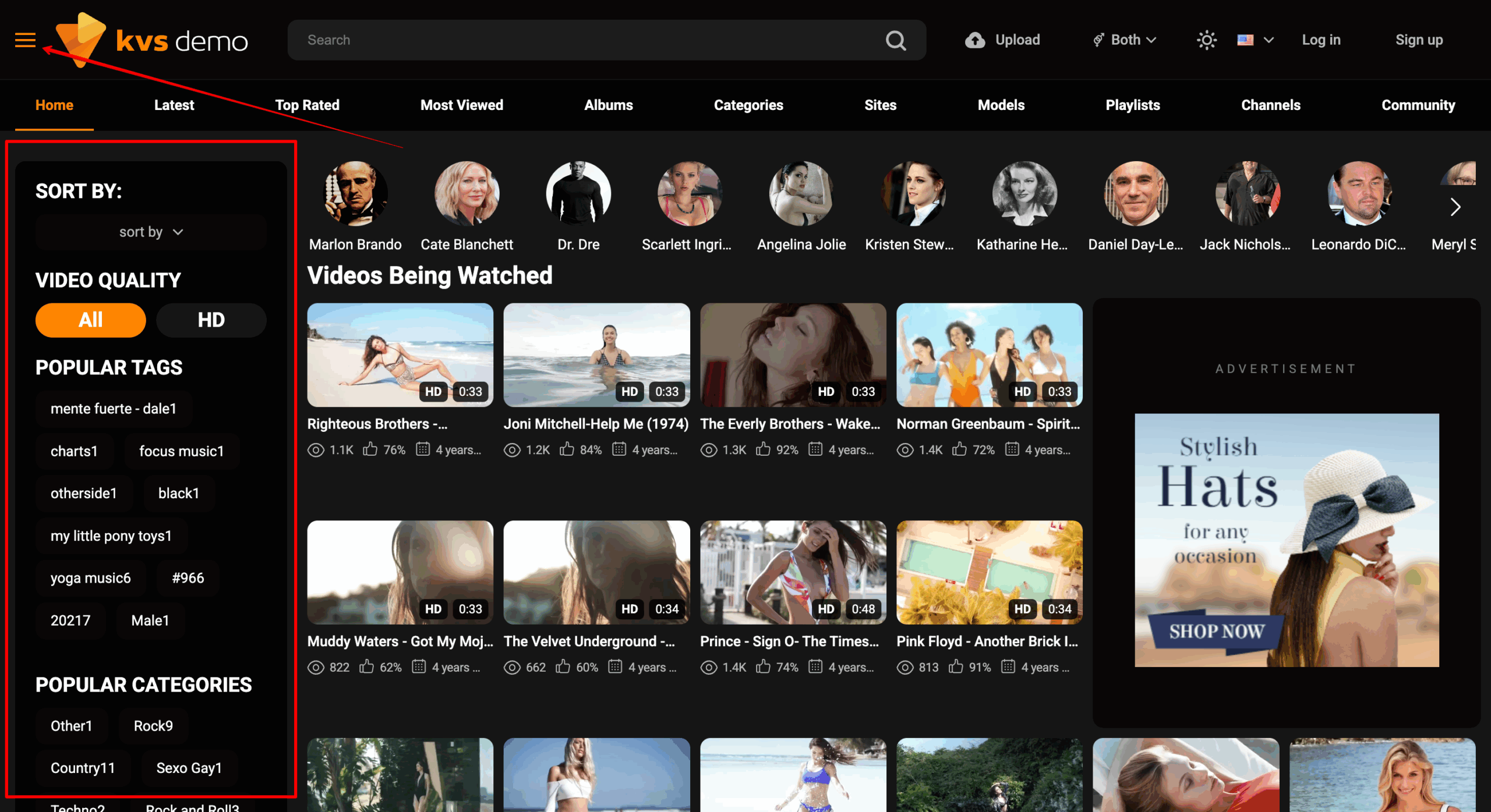
Filtering by tags or categories allows users to refine their feed and display only the content that matches their interests. This creates a more personalized experience and offers greater control over what they see.
Video example of how this feature looks
A quick double‑click on desktop or a double‑tap on mobile rewinds the video by a few seconds. This small but impactful feature helps users revisit moments without disrupting their viewing flow.
Video example of how this feature looks
On long pages, a floating button appears that instantly scrolls the user back to the top. It keeps navigation smooth and reduces the effort required to move around the site.
Video example of how this feature looks
Users can adjust visible content by selecting male, female, or mixed categories. This simple filter delivers a more relevant and enjoyable browsing experience.
Video example of how this feature looks
Logging in or creating an account through Google removes the need to remember usernames or passwords. It streamlines onboarding and encourages more users to register.
Video example of how this feature looks
Built‑in player buttons allow users to move between videos instantly. This keeps engagement high and eliminates unnecessary navigation steps.
Video example of how this feature looks
An animated slider highlights popular models, recent updates, or favorite content. It brings the interface to life and helps users quickly access the areas that interest them most.
Video example of how this feature looks
All textual elements—titles, descriptions, menus, metadata—can be fully translated into multiple languages. This expands the website’s reach and ensures clarity for an international audience.
A dedicated history page keeps track of all videos a user has watched, making it easy to revisit content without searching again. It adds convenience and enhances personalization.
Video example of how this feature looks
Each of these features contributes to a smoother, more intuitive browsing experience. When thoughtfully implemented, they help transform a standard website into a powerful, user‑friendly platform that keeps visitors engaged and encourages them to return.