Why Some Tube Sites Feel Better Than Others
The Hidden Details That Shape User Experience You’ve probably experienced this before: you open one website and within just a few seconds it already…
Your cart is empty
Your cart is empty

Modern websites vary widely in visual style, but what truly shapes an enjoyable browsing experience are the thoughtful, user‑centric features built into the interface. These subtle enhancements make navigation intuitive, reduce friction, and ensure that users feel supported at every step. Below is a refined overview of the key features we implement—each designed to make interaction smoother, more efficient, and more personalized.
On large video platforms, users often know approximately what they want to watch, but they do not always know the exact title, category, or tag. Because of this, even a standard search process can create small but important friction during navigation.
Search Suggestions solve this problem by dynamically displaying relevant recommendations while the user is typing. These suggestions may include models, categories, popular search queries, or related content.
From a UX perspective, this significantly accelerates interaction with the platform. Instead of manually browsing multiple pages or testing different search terms, users are guided toward relevant content almost instantly.
This feature becomes especially important on large-scale tube sites with constantly growing video libraries. Without intelligent search assistance, users can quickly feel overwhelmed by the amount of available content.
Beyond convenience, Search Suggestions also improve internal engagement. Users begin opening additional categories, discovering new pages, and interacting with content they may not have initially planned to search for.
As a result, the platform feels faster, more modern, and significantly more intuitive to use.
Video example of how this feature looks
As content libraries continue growing, users need faster ways to organize and navigate massive amounts of videos.
Sort Filters allow users to instantly reorganize content based on different criteria.
This helps users quickly access the type of content that matches their current interests without manually scrolling through large amounts of unrelated videos.
From a UX perspective, sorting systems reduce cognitive load and make navigation feel much more efficient.
For large tube platforms, this becomes especially important because linear browsing becomes less practical as content volume increases.
In addition, Sort Filters help improve retention. The faster users reach relevant content, the more likely they are to continue interacting with the platform.
Screenshot example of how this feature looks
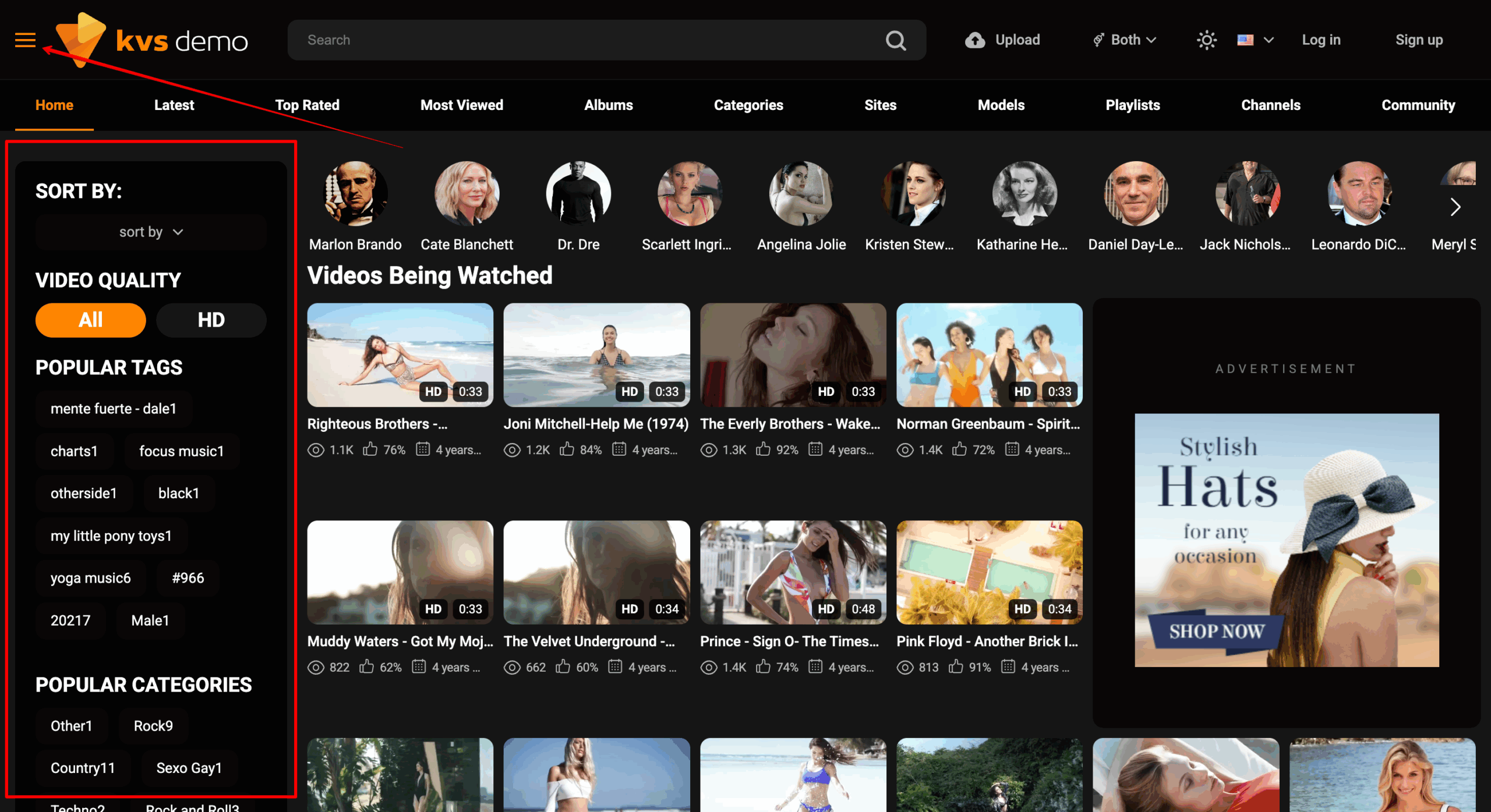
Tags and categories help transform large video libraries into a more structured and manageable system.
From the user’s perspective, filters reduce unnecessary content noise and make it easier to focus on relevant material.
This becomes especially important on large platforms where users can quickly experience information overload without proper filtering systems.
Well-structured tags and categories help:
In addition to usability improvements, filtering systems also strengthen SEO by creating a more organized internal linking structure across the platform.
When filters work logically and predictably, users interact with the website much more naturally.
Video example of how this feature looks
During video playback, users often want to quickly replay a specific moment, revisit a scene, or rewatch a detail without manually dragging the timeline.
Without a convenient rewind system, this creates unnecessary friction during viewing.
The Rewind Button makes video interaction feel significantly smoother. On mobile devices, this is usually implemented through double-tap gestures, while desktop users can use dedicated rewind controls.
Although technically simple, this feature strongly influences how modern and comfortable the player feels.
Small interaction improvements like this help the entire platform feel more polished and user-friendly, especially in today’s mobile-first content consumption environment.
Video example of how this feature looks
Tube sites often contain long pages filled with videos, recommendations, categories, and dynamic content blocks.
Constantly scrolling back to the top manually creates unnecessary friction and slows down navigation.
The Go Up Button solves this problem instantly by allowing users to return to the top of the page with a single click.
Features like this may seem minor individually, but they contribute significantly to the overall perception of comfort and usability.
When many small friction-reducing elements work together, the platform starts feeling noticeably more refined and professional.
Video example of how this feature looks
On large video platforms, users often want to quickly remove irrelevant content from their browsing experience.
Gender Filters allow users to personalize visible content based on preferences such as:
This creates a more relevant browsing experience and helps users reach preferred content faster without manually filtering unrelated videos.
From a UX perspective, personalization systems like this make the platform feel more responsive to individual preferences.
The less time users spend manually adjusting navigation, the smoother and more comfortable the browsing experience becomes.
Video example of how this feature looks
One of the most common reasons users abandon registration is overly complicated onboarding.
When users are required to manually enter emails, passwords, confirmations, and additional information, a significant portion of the audience leaves before completing the process.
Google Login dramatically simplifies registration by allowing users to create accounts in a single click.
From a UX standpoint, this reduces friction during the onboarding stage and makes the platform more accessible to new visitors.
Fast authorization systems also help:
These features are especially important on modern platforms where users expect immediate access to content.
Video example of how this feature looks
One of the key goals of a tube platform is maintaining uninterrupted content consumption.
Users should not need to constantly return to search pages or categories after finishing every video.
Next/Previous Video Buttons allow users to instantly switch between videos directly inside the player.
This creates a much smoother viewing flow and reduces unnecessary interaction steps.
From a retention perspective, these features are extremely valuable because they encourage continuous engagement with the platform.
The fewer interruptions users experience between actions, the more likely they are to continue watching additional content.
Video example of how this feature looks
Dynamic sliders help make interfaces feel more active, interactive, and visually engaging.
They can be used to display:
These elements help direct user attention toward important sections of the platform and create additional interaction opportunities.
Beyond aesthetics, sliders also improve internal navigation and encourage exploration behavior.
Users naturally begin opening more sections, discovering additional content, and spending more time interacting with the platform.
Video example of how this feature looks
For modern tube platforms, multilingual support has become an increasingly important part of long-term growth.
Full Multi-Language Support allows websites to translate:
This makes the platform significantly more accessible to international audiences and improves overall user comfort across different regions.
Beyond usability, multilingual systems also create major SEO advantages by opening opportunities for ranking across multiple language markets and geographic regions.
For large-scale projects, this becomes an essential part of expanding organic traffic globally.
Many users regularly return to previously watched videos.
Without a history system, users need to manually search for content again, creating unnecessary friction during repeat visits.
The User History Page automatically stores previously viewed content and allows users to instantly return to videos they watched earlier.
This improves convenience, strengthens personalization, and creates a stronger sense of continuity between browsing sessions.
History systems become especially valuable on large content-heavy platforms where users interact with dozens or even hundreds of videos over time.
Video example of how this feature looks
On large-scale video platforms, manually maintaining activity under thousands of videos quickly becomes unrealistic.
The AI Video Comments Plugin solves this problem by automatically generating contextual comments under videos using artificial intelligence.
The system can:
From a user perception standpoint, pages begin feeling more active, dynamic, and continuously updated.
Regular comment activity creates the impression of ongoing interaction around the content, which positively influences engagement perception.
In addition, the plugin helps strengthen content freshness signals and makes large video libraries appear more dynamic both for users and search engines.
For large projects, this type of automation becomes especially valuable because manually maintaining visible activity across thousands of pages would require significant ongoing resources.
Each of these features contributes to a smoother, more intuitive browsing experience. When thoughtfully implemented, they help transform a standard website into a powerful, user‑friendly platform that keeps visitors engaged and encourages them to return.